(0)

    レゴ® Powered UPプログラミングブロック

    レゴ® Powered UPアプリは、シンプルでわかりやすいプログラミング言語が特徴であらゆる年齢のレゴファンたちが楽しみながら学ぶことができます。 レゴブロックで遊んだブロックをつなげるときにカチっとはまる、という体験を核にしています。

    プログラミングブロックには、さまざまな種類と色があり、使用しているブロックの種類がわかります。

    ここでは、よく使われるプログラミングブロックの例をいくつか紹介します。 ブロックが何をするのかわからず、ここに記載されていない場合はアプリで試すか、プログラミングブロックガイドをご覧ください。 レゴ Powered UPの楽しみの一つは、実験、遊び、そして学ぶことにあります。

    Pale yellow circle with a triangle inside that indicates to play 黄色のフローブロック

    黄色のブロックはコマンドの流れをコントロールします。 プログラムの開始、停止、一時停止、あるいはループコマンドにも使用できます。

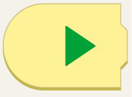
    Yellow programming block with a curved left side and a green play arrow.

    プログラムを開始します。

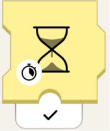
    Yellow programming block with an hourglass. At the bottom left of the hourglass, there is a stopwatch. Beneath the block there is a black checkmark.

    砂時計ブロックは、指定した秒数だけプログラムを待たせます。
     

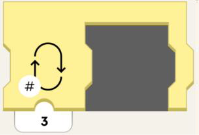
    Yellow programming block with an empty space to fit another programming block. On the left of the block is an image of a loop, and in the lower left-hand corner there is a number symbol. Beneath the block is the number 3.

    プログラムセクションをセット番号の回数ループします。

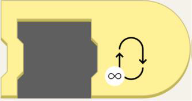
    Yellow programming block with an empty space to fit another programming block. On the block, to the right, is a loop with an infinity symbol in the lower left-hand corner.

    プログラムを永遠にループさせます!

    Orange circle with an orange eye inside. オレンジのセンサーブロック

    オレンジ色のブロックは、色と距離センサー、ムーブハブのチルトセンサー、リモコン、WeDo 2.0センサーと連動します。 これらのブロックは、モデルのセンサーが何かを検知するとアクションをトリガーします。

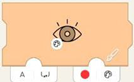
    Left-closed orange programming block with eye. On the lower left of the eye is an image of a painter's pallet. Tab on right has red circle next to a painter's pallet. Tab on left has the letter A and a bracket with in and out arrows.

    カラーセンサーを使用して、特定の色が感知されたときにイベントをトリガーします。
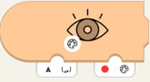
    Orange programming block with eye. On the lower left of the eye is an image of a painter's pallet. Lower right tab has a red circle next to a painter's pallet. On the left, there's a tab with the letter A and a bracket with in and out arrows.

    カラーセンサーがブロックで選択された色を検出するのを待ちます。

    Orange programming block with eye and nub on top. On the lower left of the eye is an image of a painter's pallet. There's a white tab on the bottom with the letter A and a bracket with in and out arrows.

    センサーが測定した現在の色を取得します。
    Orange programming block with eye and nub on top. On lower left of the eye is a scale of white to black. There's a white tab on the bottom with the letter A and a bracket with in and out arrows.センサーが測定した現在の環境光レベルを取得します。

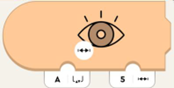
    Orange programming block with eye, closed on left side. On lower left of the eye is a line with hatch marks. Bottom left tab has letter A and a bracket with in and out arrows. On the right is a tab with 5 and a line with hatch marks.

    センサーが測定した距離が指定した距離より小さい場合にトリガーします。

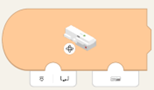
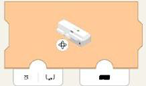
    Orange programming block with curved left side and image of Move Hub. On lower left of hub is a rotation symbol. Bottom left tab has image of hub port and bracket with in and out arrows. Bottom right has tab with image of hub.

    内蔵ジャイロスコープを使用し、ハブの向きに基づいてイベントをトリガーします。 ハブの向きがハブの向きと同じになるまで待ちます。

    Orange programming block with image of Move Hub. On lower left of hub is a rotation symbol. On bottom left tab is an image of hub port and bracket with in and out arrows. Bottom right tab has black rectangle.

    ハブの向きがハブの向きと同じになるまで待ちます。

    Green circle with a green propeller image. グリーン・モーターまたはムーブメント・ブロック

    緑色のブロックがモデルを動かします! タコモーター(速度と位置の制御用)とベーシックモーター(全速駆動用)を区別することができます。
     

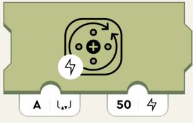
    Olive green programming block with image of circle and arrows representing turning. On the bottom left of this image is a lighting symbol. Bottom left tab with the letter A and a bracket with in and out arrows. Right tab has number 50 and lightning image.

    モーターへの電力を設定します。 正の数は時計回りに、負の数は反時計回りに回転します。
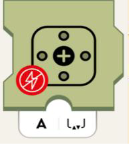
    Olive green programming block with motor symbol. On lower left of symbol is red circle with crossed-out lightning symbol. Bottom white tab has the letter A and a bracket with in and out arrows.モーターから電力を取り除き、モーターをゆっくりと停止させます。
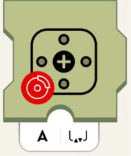
    Olive green programming block with motor symbol. On lower left of symbol is red circle with image of car brake. Bottom white tab has the letter A and a bracket with in and out arrows.モーターを停止します。

    Purple circle with purple dial in the middle and little circles all around. 紫色の音と光のブロック

    紫色のブロックは、デバイスのスピーカーからサウンドを再生したり、ムーブハブ、色や距離センサーのライトの色を変更することができます。 これらのブロックは、LEDライトの光も制御します。

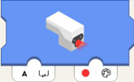
    Blue programming block with sensor light glowing. White tab on the bottom left with the letter A and a bracket with in and out arrows. On the lower right, there's a tab with a red circle next to a painter's pallet.

    センサーLEDの色を設定します。
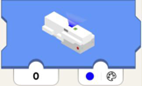
    Blue programming block with hub light glowing. Lower left tab has number 0. Tab on lower right has blue circle with painters pallet.ハブLEDの設定し、色を示します。
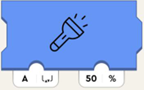
    Blue programming block with flashlight symbol. Bottom left white tab has the letter A and a bracket with in and out arrows. Bottom right tab has number and percent symbol.接続されているライトの明るさを指定したポートに設定します。
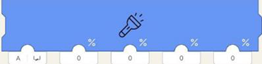
    Long blue programming block with flashlight symbol. First tab on lower left has letter A and brackets with in and out arrows.  4 other tabs have zeros.ポート(左のパラメータ)に接続されたライトの明るさを設定しますが、センサーの4つのLED半円を個別に設定します。

    左から右へ影響するもの:
    • 右「目」上アーク
    • 左「目」上アーク
    • 右「目」下アーク
    • 左「目」下アーク
    Blue programming block with house symbol. On lower left of symbol is a volume icon. The below tab has number 2.ハウスサウンドライブラリから選択したサウンドを再生します。
    Blue programming block with whistle symbol, on lower left of symbol is volume icon. Below tab has number 2. ホイッスルサウンドライブラリから選択したサウンドを再生します。
    Blue programming block with train symbol, on lower left of symbol is volume icon. Below tab has number 2. 列車サウンドライブラリから選択したサウンドを再生します。
    Blue programming block with car symbol, on lower left of symbol is volume icon. Below tab has number 2. 車サウンドライブラリから選択したサウンドを再生します。
    Blue programming block with airplane symbol, on lower left of symbol is volume icon. Below tab has number 2. 飛行機サウンドライブラリから選択したサウンドを再生します。
    Blue programming block with dog symbol, on lower left of symbol is volume icon. Below tab has number 2. 犬サウンドライブラリから選択したサウンドを再生します。
    Blue programming block with cat symbol, on lower left of symbol is volume icon. Below tab has number 2. 猫サウンドライブラリから選択したサウンドを再生します。
    Blue programming block with whoopie cushion symbol, on lower left of symbol is volume icon. Below tab has number 2. おならサウンドライブラリから選択したサウンドを再生します。
    Blue programming block with the horn symbol, on lower left of symbol is volume icon. Below tab has number 2. 笛サウンドライブラリから選択したサウンドを再生します。
    Blue programming block with hand clapping symbol, on lower left of symbol is volume icon. Below tab has number 2. 雑踏サウンドライブラリから選択したサウンドを再生します。
    Blue programming block with robot symbol, on lower left of symbol is volume icon. Below tab has number 2.ロボットサウンドライブラリから選択したサウンドを再生します。
    Blue programming block with raygun symbol, on lower left of symbol is volume icon. Below tab has number 2.ターゲットサウンドライブラリから選択したサウンドを再生します。

    Teal circle with dark teal joystick inside. ティール・ウィジェット・ブロック

    ティールブロックは、ウィジェットでモデルをコントロールすることができます。

    Green small programming block with nub on top. Has image of button. Tab underneath has number zero.   

    Channel-ID(第一パラメータ)を持つウィジェット・キャンバスのボタンウィジェットの状態(true/falseまたは0/1)を報告します。

    Green small programming block with nub on top. Has slider icon. Tab underneath has number zero.

    Channel-ID(第一パラメータ)を持つウィジェット・キャンバスのトグルウィジェットの状態(true/false または 0/1)を報告します。
    Green small programming block with nub on top. Has image of directional button, with arrows front, back, left, right. Tab underneath has number zero.Channel-ID(第一パラメータ)を軸として、ウィジェット・キャンバスのマルチボタンウィジェットの状態を報告します。 つまり、下のボタンを押すと、-100、上のボタンを押すと100を報告します。 どちらも押されていない場合は、0となります。
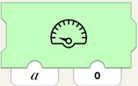
    Green programming block with image of speedometer. Two tabs are on the bottom, the one on the left has letter a, the one on the right has number 0.ウィジェット・キャンバスの速度計、整数ディスプレイ、または Channel-ID(第一パラメータ)を持つその他のディスプレイに、値(第二パラメータ)を表示するように指示します。
    Green small programming block with nub on top. Has slider icon with hatch marks inside. Tab underneath has number zero.Channel-ID(第一パラメータ)を持つウィジェット・キャンバスのスライダーウィジェットの位置(-100から100)を報告します。
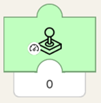
    Green small programming block with nub on top. Has joystick icon on block with image of speedometer in lower lefthand corner. Tab underneath has number zero.Channel-ID(第一パラメータ)を持つウィジェット・キャンバスのジョイスティックウィジェットの振幅(-100から100)を報告します。

    ジョイスティックが中心から離れるほど、数値は高くなります。 ジョイスティックの上半分では、報告される数値はプラスになります。 下半分はマイナスとなります。
    Green small programming block with nub on top. Has joystick icon on block with image of steering wheel in lower lefthand corner. Tab underneath has number zero.角度を報告します(-90から90度の角度ではなく、-100から100に正規化されます!)ウィジェット・キャンバスのジョイスティックウィジェットのChannel-ID(第一パラメータ)。

    ジョイスティックが(振幅に関係なく)真上または真下を向いた場合、ブロックは0を出力します。 その後、ジョイスティックのハンドルを時計回りに動かすと、数値はマイナスになり、真左または真右で-100になるまで減少します。 反時計回りに回転させると、数値はプラスになり、100に向かって増加します。


    上記のブロックについてご質問がある場合、またはその他のことでお困りの場合は、お気軽にお問い合わせください