1/18

10+
831

SMART Play™ enabled
Add a SMART Brick to unlock interactive possibilities
Set includes the following:
2 x SMART Tags
SMART Brick not included
SMART Play™Compatible
LEGO Pokémon™ SMART Play#72165
SMART Play™: Umbreon vs. Garchomp Championship Battle
$79.99
Available nowLimit 3
Limit
We restrict the limit a household can buy in order to be fair to all of our fans. If you’ve already reached that limit through previous orders your entire order may be cancelled.
Earn 520 LEGO® Insiders Points
FREE Shipping with orders over $35!*
Features
Features

Did you miss the livestream?
Catch up with our demo of new LEGO® Pokémon™ SMART Play™ sets, a Q&A with designers and more!
You're the Trainer now
Build a battle between night and might with the new LEGO® Pokémon™ Umbreon vs. Garchomp Championship Battle SMART Play™ Compatible set. Compatible sets are great for building play on their own. Add SMART Bricks from any All-in-One set to unlock interactive battles and bring their play to life! Whether they’re starting the journey or expanding their team, LEGO Pokémon SMART Play sets offer responsive fun that keeps the adventure going—from bonding to battling like a true Pokémon Trainer.
Add SMART Bricks from LEGO® SMART Play™ All-in-One sets to unlock interactive fun
SMART Brick not included
Umbreon vs. Garchomp Championship Battle does not include a SMART Brick, but one or more can be added from sets 72164 and 72167.


More Pokémon. More action. More ways to train
Shop LEGO® Pokémon™ SMART Play™ All-in-One sets to unlock the interactive fun of Compatible sets with SMART Bricks.
All-In-One
2 Sets
LEGO® SMART Play™ Sets
Shop All-in-One sets for SMART Bricks.


Bring play to life!
Discover new LEGO® SMART Play™ sets that react to your every move!
Extend your play
Extend your play
FAQ
Do I need a device (phone or tablet) to use LEGO® SMART Play™ products?
No, LEGO® SMART Play™ sets promote screen-free play! A phone or tablet is not required to enjoy interactive features. However, the SMART Brick volume and other parameters can be adjusted through the LEGO® SMART Assist app, including firmware updates to already owned SMART Bricks.
What's the difference between LEGO® SMART Play™ All-in-One sets and Compatible sets?
All-In-One sets include one or more SMART Bricks, which enable the action and functionality of SMART Minifigures and SMART Tags. Compatible sets are great building sets on their own, but come alive once a SMART Brick is added from any All-in-One set to unlock LEGO® SMART Play™ features.
Are all LEGO® SMART Play™ sets compatible with each other?
Yes! All SMART Bricks, SMART Tags and SMART Minifigures are compatible with any LEGO® SMART Play™ set. Just make sure your SMART Brick's firmware is up to date and you are good to go!
How do I recharge SMART Bricks?
All-in-One sets include one or more SMART Bricks, one SMART Charger and one USB-C charging cable. To ensure your SMART Bricks are fully charged by the time your build is complete, use the charging cable to plug the SMART Charger in and place one or multiple SMART Bricks on the charger for up to 2hrs 30mins. You can charge and recharge SMART Bricks for endless responsive play!
Are there any important updates to download for included SMART Bricks and how do I do that?
All-in-One sets include one or more SMART Bricks that are ready for interactive play right out of the box! When new LEGO® SMART Play™ features are rolled out or new Compatible sets are launched, already owned SMART Bricks can be easily and quickly updated through the LEGO® SMART Assist app.
How will I know that it’s time to update my already owned SMART Bricks?
You’ll get a notification in the LEGO® SMART Assist app when it’s time to update your SMART Bricks. If you’ve connected your SMART Brick to your device and enable notifications, you’ll also get a push notification. If you’ve recently bought a new LEGO SMART Play™ set, already owned SMART Bricks will make a sound to let you know an update is required in order to experience all interactive features.
Where can I learn more about the LEGO® SMART Play™ system?
You can learn more about how to supercharge your creativity at our LEGO® SMART Play™ Hub!
Specifications
Specifications
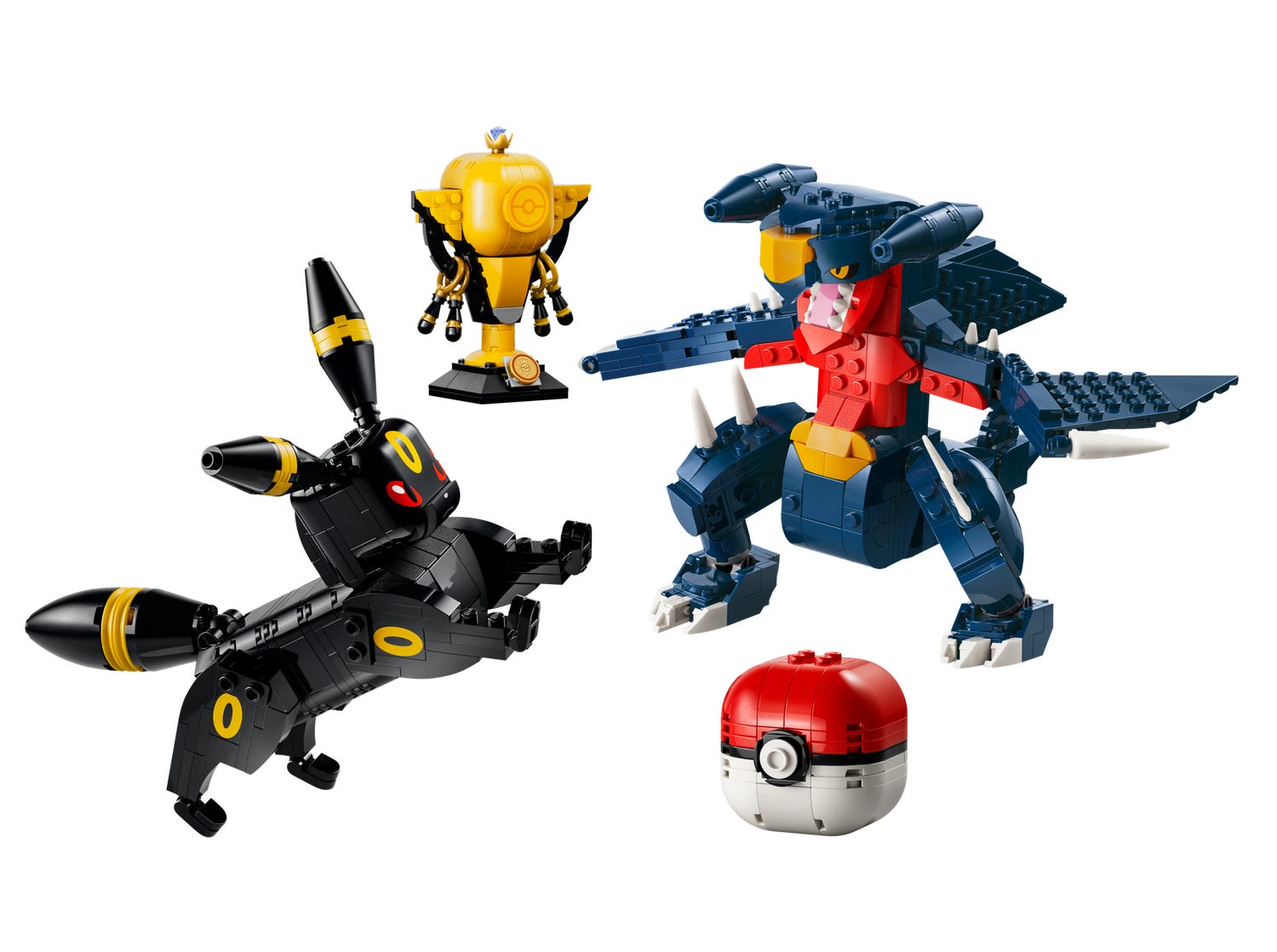
Become a Pokémon Trainer and champion with SMART Play™: Umbreon vs. Garchomp Championship Battle (72165), a toy building set featuring 2 highly posable LEGO® Pokémon™ figures. The 2 Pokémon offer endless play possibilities and are accompanied by a large Poké Ball and a trophy.
The 2 Pokémon each incorporate a SMART Tag. SMART Bricks found in All-In-One Sets (sold separately) bring Pokémon Trainer adventures to life with immersive interactive play possibilities, enabling Pokémon and other SMART T ag play elements to react with responsive sounds, lights and more as kids move the Pokémon around. This collectible set, inspired by the popular video game, makes a great birthday, holiday or any day gift for boys, girls and fans of Pokémon ages 10 and up. This set contains 831 pieces.
- BATTLE ACTION BUILDING TOY – Umbreon vs. Garchomp Championship Battle (72165) is a LEGO® SMART Play™ Compatible Set that turns Pokémon Trainers into champions
- HANDS-ON GAMING ADVENTURES – Kids can create exciting action scenes as they stage competitions between the Pokémon and award the trophy
- POKÉMON PLAYS BACK – SMART Tags in Umbreon and Garchomp activate SMART Bricks (not included), triggering sound and lights as Pokémon react to each other and kids’ interactive role play
- 2 POKÉMON FIGURES – Fans can enjoy endless play possibilities with these detailed, highly posable models of Umbreon and Garchomp and enjoy SMART Play™ interactions as they battle
- HOW TO ACTIVATE YOUR SET – Add a LEGO® SMART Brick from an All-in-One Set (sold separately) to enable immersive play functions. SMART Bricks are not available to purchase as a stand-alone product
- SCREEN-FREE PLAYTIME – Kids can join friends and family for endless imaginative fun and thrilling battles
- GIFT IDEA FOR KIDS – Treat boys and girls ages 10 and up to this collectible set, a great birthday or any day gift idea featuring 2 striking Pokémon figures
- DIMENSIONS – The Garchomp figure in this 831-piece building toy stands over 5.5 in. (14 cm) tall