LEGO® Trains
We love our trains! LEGO® Trains have undergone several changes, modifications, and of course, lots of improvements over the years. If you’re curious about the bygone era of LEGO trains, take a journey to our history page.
If you’re looking for troubleshooting for DUPLO® trains, check out our tips for DUPLO trains.
Compatibility
There’s some compatibility across all LEGO trains. Over the years, we've never changed the width of the train tracks.
Older LEGO trains will have metal along the tracks, as electricity traveling through the tracks would power the old motors through the metal in their wheels. Our newer trains run on batteries, so our tracks no longer contain the metal along the tracks.
While all train cars can sit and connect to each other on both types of track, the old 9V and 12V trains can only be powered on the old tracks that include metal and attach to a control panel. The newer Power Functions and Powered Up trains can run on both types of track because they’re powered by an internal battery box.
Powered Up hubs are not compatible with Power Function motors and Power Function hubs/receivers are not compatible with Powered Up motors.
Power Functions
There are two Power Functions remote styles, but they operate the same way. The remotes and receivers have 4 channels that can be selected using the orange switches. The selected channel must be the same on both remote and receiver to make them work together. You can use all 4 channels at the same time if you have enough remotes and receivers set on different channels.
Remotes:
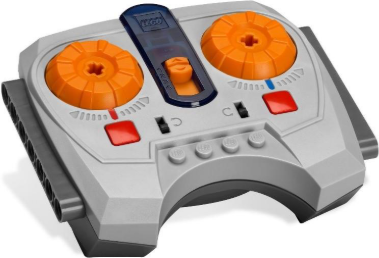
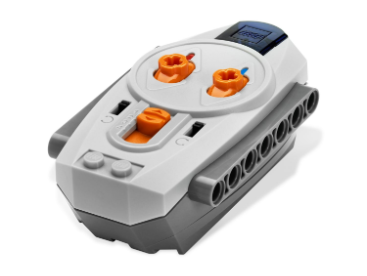
Receiver:
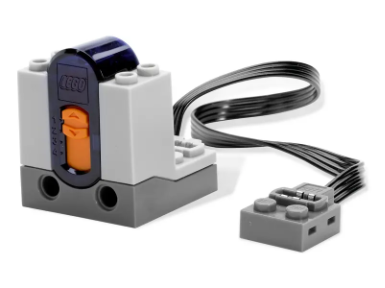
The dial or switch on the remote that’s marked with the red strip controls the motor that’s plugged into the red socket of your receiver. The dial or switch with the blue strip controls the output of the blue marked plug. Selecting another channel and controlling two more Power Functions is as simple as moving the orange switch in the center.
Troubleshooting Power Functions trains
- Check the batteries in your battery box and remote. The green light on your battery box should come on when you press the power button and the green light on the remote should turn on when you press the buttons on it. If one of them doesn’t light up, try putting in new batteries. We recommend using alkaline batteries and not mixing brands.
- Check your plugs. Disconnect the wires that go from the motor to the receiver and from the receiver to the battery box. Hook them back up again. It’s possible something might not have been connected right.
- Check the remote and receiver. Make sure the channels on the remote and receiver are the same. The green light on the receiver should flicker when you press buttons on the remote. This lets you know that it’s receiving the signal.
- Check your motor. Connect the motor directly to the battery box and turn the battery box on.
Powered Up trains
All trains currently in production use Powered Up hubs and motors. Powered Up trains can be controlled using the Powered Up app, and our Powered Up troubleshooting guide is really useful should you run into issues and need help.