乐高®Powered UP编程块

    乐高®Powered UP APP采用了一种简单易懂的编程语言,所有年龄段的乐高粉丝都将喜欢学习和尝试使用。其核心体验是任何乐高粉丝都会本能地理解的——将积木块堆叠在一起,并观察它们如何自动对齐。

    编程块有多种类型和颜色,以告知您正在使用哪种类型的积木块。

    以下是常用的编程块示例。如果您不确定某个块的功能,并且它未在此处列出,您可以尝试在APP中使用该块,或者查看我们的完整编程块指南。乐高Powered UP的乐趣之一在于实验、玩耍和学习。

    Pale yellow circle with a triangle inside that indicates to play 黄色流程块

    黄色块控制命令流程。您可以使用它们来启动程序、停止程序、暂停程序,甚至循环命令。

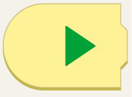
    Yellow programming block with a curved left side and a green play arrow.

    此程序块启动程序。

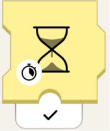
    Yellow programming block with an hourglass. At the bottom left of the hourglass, there is a stopwatch. Beneath the block there is a black checkmark.


    此沙漏块将使程序等待指定秒数。

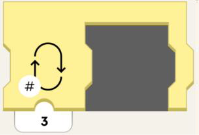
    Yellow programming block with an empty space to fit another programming block. On the left of the block is an image of a loop, and in the lower left-hand corner there is a number symbol. Beneath the block is the number 3.

    该块将循环执行程序部分一定次数。

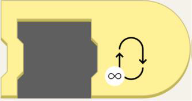
    Yellow programming block with an empty space to fit another programming block. On the block, to the right, is a loop with an infinity symbol in the lower left-hand corner.

    此程序块将使程序循环执行,直到被中断!


    Orange circle with an orange eye inside. 橙色感应块

    橙色块与颜色和距离传感器、Move Hub的倾斜传感器、遥控器和WeDo 2.0传感器配合使用。当模型上的传感器检测到某些东西时,这些模块将触发动作。

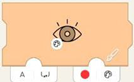
    Left-closed orange programming block with eye. On the lower left of the eye is an image of a painter's pallet. Tab on right has red circle next to a painter's pallet. Tab on left has the letter A and a bracket with in and out arrows.

    使用颜色传感器在检测到特定颜色时触发一个活动。
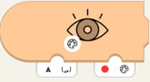
    Orange programming block with eye. lower left of the eye is an image of a painter's pallet. In the lower right, there's a tab with a red circle next to a painter's pallet. On the left, there's a tab with the letter A and a bracket with in and out arrows.

    等待颜色传感器检测到模块中选择的颜色。

    Orange programming block with eye and nub on top. On the lower left of the eye is an image of a painter's pallet. There's a white tab on the bottom with the letter A and a bracket with in and out arrows.

    获取传感器测量的当前颜色。
    Orange programming block with eye and nub on top. On lower left of the eye is a scale of white to black. There's a white tab on the bottom with the letter A and a bracket with in and out arrows.获得传感器测量的当前环境光照级别。

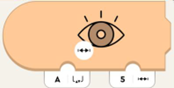
    Orange programming block with eye. On lower left of the eye is a line with hatch marks. There's a white tab on the bottom left with the letter A and a bracket with in and out arrows. On the right is a tab with 5 and a line with hatch marks.

    当传感器测量的距离小于指定距离时触发。

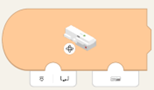
    Orange programming block with curved left side and image of Move Hub. On lower left of hub is a rotation symbol. On bottom left tab is an image of hub port and bracket with in and out arrows. Bottom right has tab with image of hub.

    使用内部陀螺仪根据集线器的方向触发一个活动。等待集线器方向与集线器方向相等。

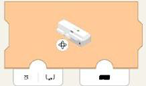
    Orange programming block with image of Move Hub. On lower left of hub is a rotation symbol. On bottom left tab is an image of hub port and bracket with in and out arrows. Bottom right tab has black rectangle.

    等待集线器方向与集线器方向相等。


    Green circle with a green propeller image. 绿色马达或运动模块

    绿色模块让您的模型动起来!您可以区分测速电机(用于控制速度和位置)和基本电机(用于全速驱动)。

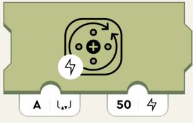
    Olive green programming block with image of circle and arrows representing turning. On the bottom left of this image is a lighting symbol. Bottom left tab with the letter A and a bracket with in and out arrows. Right tab has number 50 and lightning image.

    为电机供电。正数顺时针旋转,负数逆时针旋转。
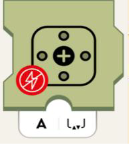
    Olive green programming block with motor symbol. On lower left of symbol is red circle with crossed-out lightning symbol. Bottom white tab has the letter A and a bracket with in and out arrows.切断电机电源,电机将慢慢停止。
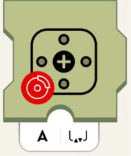
    Olive green programming block with motor symbol. On lower left of symbol is red circle with image of car brake. Bottom white tab has the letter A and a bracket with in and out arrows.停止电机。


    Purple circle with purple dial in the middle and little circles all around. 紫色音响和灯光积木

    紫色积木可以通过设备的扬声器播放声音,改变 Move Hub 上的灯光颜色、颜色和距离传感器。这些积木还可以控制 LED 灯的灯光。

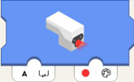
    Blue programming block with sensor light glowing. White tab on the bottom left with the letter A and a bracket with in and out arrows. On the lower right, there's a tab with a red circle next to a painter's pallet.

    设置传感器 LED 的颜色。
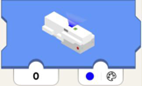
    Blue programming block with hub light glowing. Lower left tab has number 0. Tab on lower right has blue circle with painters pallet.设置集线器 LED 显示颜色。
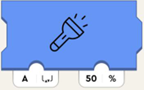
    Blue programming block with flashlight symbol. Bottom left white tab has the letter A and a bracket with in and out arrows. Bottom right tab has number and percent symbol.将连接的灯的亮度设置为指定的端口。
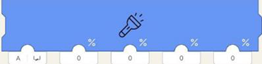
    Long blue programming block with flashlight symbol. First tab on lower left has letter A and brackets with in and out arrows.  4 other tabs have zeros.

    将连接灯上的灯光亮度设置为端口(左参数),但单独设置传感器上的四个 LED 半圆。

    从左到右,它们影响:

    • 右“眼”上弧
    • 左“眼”上弧
    • 右“眼”下弧
    • 左“眼”下弧
    Blue programming block with house symbol. On lower left of symbol is a volume icon. The below tab has number 2.播放来自室内声音库中选定的声音。
    Blue programming block with whistle symbol, on lower left of symbol is volume icon. Below tab has number 2.播放来自哨声库中选定的声音。
    Blue programming block with train symbol, on lower left of symbol is volume icon. Below tab has number 2.播放来自火车声音库中选定的声音。
    Blue programming block with car symbol, on lower left of symbol is volume icon. Below tab has number 2.播放汽车声音库中选定的声音。
    Blue programming block with airplane symbol, on lower left of symbol is volume icon. Below tab has number 2.播放飞机声音库中选定的声音。
    Blue programming block with dog symbol, on lower left of symbol is volume icon. Below tab has number 2.播放狗狗声音库中选定的声音。
    Blue programming block with cat symbol, on lower left of symbol is volume icon. Below tab has number 2.播放猫咪声音库中选定的声音。
    Blue programming block with whoopie cushion symbol, on lower left of symbol is volume icon. Below tab has number 2.播放屁声音库中选定的声音。
    Blue programming block with the horn symbol, on lower left of symbol is volume icon. Below tab has number 2.播放喇叭声音库中选定的声音。
    Blue programming block with hand clapping symbol, on lower left of symbol is volume icon. Below tab has number 2.播放人群声音库中选定的声音。
    Blue programming block with robot symbol, on lower left of symbol is volume icon. Below tab has number 2.播放机器人声音库中选定的声音。
    Blue programming block with raygun symbol, on lower left of symbol is volume icon. Below tab has number 2.播放目标声音库中选定的声音。


    Teal circle with dark teal joystick inside. Teal Widget模块

    蓝绿色模块可让您使用小部件控制模型。

    Green small programming block with nub on top. Has image of button. Tab underneath has number zero.   

    使用Channel-ID(第一参数)报告小部件画布的按钮小部件的状态 (true/false或0/1)。

    Green small programming block with nub on top. Has slider icon. Tab underneath has number zero.

    使用Channel-ID(第一参数)报告小部件画布的切换小部件的状态 (true/false或0/1)。
    Green small programming block with nub on top. Has image of directional button, with arrows front, back, left, right. Tab underneath has number zero.使用Channel-ID(第一参数)报告小部件画布的多按钮小部件的状态,作为坐标轴。这意味着:如果按下下按钮,则报告-100;如果按下上按钮,则报告100。如果都不按下,则报告0。
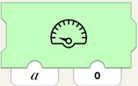
    Green programming block with image of speedometer. Two tabs are on the bottom, the one on the left has letter a, the one on the right has number 0.指示小部件画布的速度计、整数显示器或任何其他具有 Channel-ID(第一参数)的显示器显示值(第二参数)。
    Green small programming block with nub on top. Has slider icon with hatch marks inside. Tab underneath has number zero.使用Channel-ID(第一参数)报告小部件画布滑块小部件的位置(-100到100)。
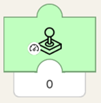
    Green small programming block with nub on top. Has joystick icon on block with image of speedometer in lower lefthand corner. Tab underneath has number zero.使用Channel-ID(第一参数)报告小部件画布的操纵杆小部件的振幅(-100到100)。

    操纵杆与中心拉得越远,显示的数字就越大。在操纵杆的上半部分,显示的数字为正数。下半部分为负数。
    Green small programming block with nub on top. Has joystick icon on block with image of steering wheel in lower lefthand corner. Tab underneath has number zero.报告小部件画布的操纵杆小部件与Channel-ID(第一参数)的角度(标准化为-100到100,而不是度数,度数为-90到90!)。

    如果操纵杆直接向上或向下(无论振幅如何),则该模块输出0。如果操纵杆手柄顺时针移动,则该数字变为负数并减小,直到直接向左或向右达到-100。如果反时针旋转,则该数字为正数并增加到100。


    如果您对上述任何内容有任何疑问,或者需要其他任何帮助,请联系我们