LEGO® Powered UP 程式設計積木

    LEGO® Powered UP 應用程式採用簡單、易於理解的程式設計語言,讓各年齡層的樂高粉絲都能享受學習和嘗試它的樂趣。 它基於任何樂高迷都會本能地理解的核心體驗 - 將積木堆疊在一起並看著它們卡入到位。

    程式設計積木有多種類型和顏色,好讓您知道您正在使用的積木類型。

    以下是一些常用程式設計積木的示例。 如果您不確定某塊積木有什麽作用並且此處未列出這塊積木,您可以在應用程式中嘗試它或查看我們完整的程式設計積木指南。 LEGO Powered UP 的部分樂趣在於實驗、遊玩和學習。

    Pale yellow circle with a triangle inside that indicates to play 黃色流程組塊

    黃色方塊控制您的命令流。 您可以使用它們來啟動程序、停止程序、暫停程序甚至循環命令。

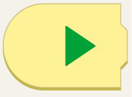
    Yellow programming block with a curved left side and a green play arrow.

    這塊積木會啟動程序。

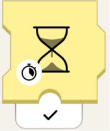
    Yellow programming block with an hourglass. At the bottom left of the hourglass, there is a stopwatch. Beneath the block there is a black checkmark.

    這塊沙漏積木將使程序等待指定的秒數。

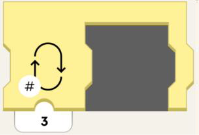
    Yellow programming block with an empty space to fit another programming block. On the left of the block is an image of a loop, and in the lower left-hand corner there is a number symbol. Beneath the block is the number 3.

    這塊積木將會循環執行程序部分,循環次數為設定值。

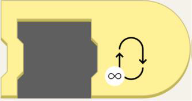
    Yellow programming block with an empty space to fit another programming block. On the block, to the right, is a loop with an infinity symbol in the lower left-hand corner.

    這塊積木將永遠循環執行程序!

    Orange circle with an orange eye inside. 橘色感應器組塊

    橘色積木與顏色和距離感應器、Move Hub 的 傾斜感應器、遙控和 WeDo 2.0 感應器配合使用。 這些積木將在您模型上的感應器偵測到某物時觸發一個動作。

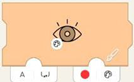
    Left-closed orange programming block with eye. On the lower left of the eye is an image of a painter's pallet. Tab on right has red circle next to a painter's pallet. Tab on left has the letter A and a bracket with in and out arrows.

    使用顏色感應器在偵測到特定顏色時觸發活動。
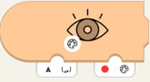
    Orange programming block with eye. On the lower left of the eye is an image of a painter's pallet. Lower right tab has a red circle next to a painter's pallet. On the left, there's a tab with the letter A and a bracket with in and out arrows.

    等待顏色感應器偵測到在積木中選擇的顏色。

    Orange programming block with eye and nub on top. On the lower left of the eye is an image of a painter's pallet. There's a white tab on the bottom with the letter A and a bracket with in and out arrows.

    取得感應器測量到的當前顏色。
    Orange programming block with eye and nub on top. On lower left of the eye is a scale of white to black. There's a white tab on the bottom with the letter A and a bracket with in and out arrows.取得感應器測量到的當前環境光水平。

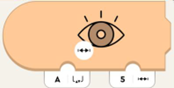
    Orange programming block with eye, closed on left side. On lower left of the eye is a line with hatch marks. Bottom left tab has letter A and a bracket with in and out arrows. On the right is a tab with 5 and a line with hatch marks.

    當感應器測量到的距離小於指定距離時觸發。

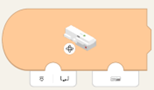
    Orange programming block with curved left side and image of Move Hub. On lower left of hub is a rotation symbol. Bottom left tab has image of hub port and bracket with in and out arrows. Bottom right has tab with image of hub.

    使用內部陀螺儀根據主機的方向觸發活動。 等待主機方向與輪轂方向一致。

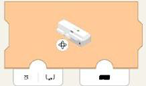
    Orange programming block with image of Move Hub. On lower left of hub is a rotation symbol. On bottom left tab is an image of hub port and bracket with in and out arrows. Bottom right tab has black rectangle.

    等待主機方向與輪轂方向一致。

    Green circle with a green propeller image. 綠色馬達或移動積木

    綠色積木會讓您的模型動起來! 您可以區分轉速馬達(用於控制速度和位置)和基本馬達(用於全速驅動)。

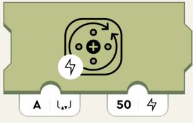
    Olive green programming block with image of circle and arrows representing turning. On the bottom left of this image is a lighting symbol. Bottom left tab with the letter A and a bracket with in and out arrows. Right tab has number 50 and lightning image.

    設定馬達動力。 正數順時針旋轉,負數逆時針旋轉。
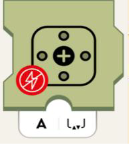
    Olive green programming block with motor symbol. On lower left of symbol is red circle with crossed-out lightning symbol. Bottom white tab has the letter A and a bracket with in and out arrows.中斷馬達動力,馬達將逐漸停止運轉。
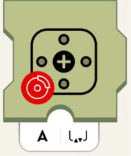
    Olive green programming block with motor symbol. On lower left of symbol is red circle with image of car brake. Bottom white tab has the letter A and a bracket with in and out arrows.停止馬達。

    Purple circle with purple dial in the middle and little circles all around. 紫色聲光積木

    紫色積木可以透過裝置的揚聲器播放聲音,更改 Move Hub、顏色和距離感應器上燈光的顏色。 這些積木還控制 LED 燈上的燈光。

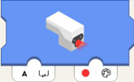
    Blue programming block with sensor light glowing. White tab on the bottom left with the letter A and a bracket with in and out arrows. On the lower right, there's a tab with a red circle next to a painter's pallet.

    設定感應器 LED 的顏色。
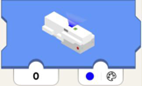
    Blue programming block with hub light glowing. Lower left tab has number 0. Tab on lower right has blue circle with painters pallet.設定主機 LED 以顯示顏色。
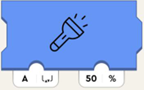
    Blue programming block with flashlight symbol. Bottom left white tab has the letter A and a bracket with in and out arrows. Bottom right tab has number and percent symbol.設定連接到指定連接埠的燈光亮度。
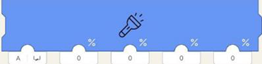
    Long blue programming block with flashlight symbol. First tab on lower left has letter A and brackets with in and out arrows.  4 other tabs have zeros.設定連接到連接埠的燈光亮度(左參數),但分別設定感應器上的四個 LED 半圓。

    從左到右,它們影響:
    • 右「眼」上弧
    • 左「眼」上弧
    • 右「眼」下弧
    • 左「眼」下弧
    Blue programming block with house symbol. On lower left of symbol is a volume icon. The below tab has number 2.播放從房屋聲音庫中選擇的聲音。
    Blue programming block with whistle symbol, on lower left of symbol is volume icon. Below tab has number 2. 播放從口哨聲音庫中選擇的聲音。
    Blue programming block with train symbol, on lower left of symbol is volume icon. Below tab has number 2. 播放從火車聲音庫中選擇的聲音。
    Blue programming block with car symbol, on lower left of symbol is volume icon. Below tab has number 2. 播放從汽車聲音庫中選擇的聲音。
    Blue programming block with airplane symbol, on lower left of symbol is volume icon. Below tab has number 2. 播放從飛機聲音庫中選擇的聲音。
    Blue programming block with dog symbol, on lower left of symbol is volume icon. Below tab has number 2. 播放從狗狗聲音庫中選擇的聲音。
    Blue programming block with cat symbol, on lower left of symbol is volume icon. Below tab has number 2. 播放從貓咪聲音庫中選擇的聲音。
    Blue programming block with whoopie cushion symbol, on lower left of symbol is volume icon. Below tab has number 2. 播放從放屁聲音庫中選擇的聲音。
    Blue programming block with the horn symbol, on lower left of symbol is volume icon. Below tab has number 2. 播放從喇叭聲音庫中選擇的聲音。
    Blue programming block with hand clapping symbol, on lower left of symbol is volume icon. Below tab has number 2.播放從人群聲音庫中選擇的聲音。
    Blue programming block with robot symbol, on lower left of symbol is volume icon. Below tab has number 2.播放從機器人聲音庫中選擇的聲音。
    Blue programming block with raygun symbol, on lower left of symbol is volume icon. Below tab has number 2.播放從目標聲音庫中選擇的聲音。

    Teal circle with dark teal joystick inside. 青色小部件積木

    青色積木讓您可以使用小部件來控制模型。

    Green small programming block with nub on top. Has image of button. Tab underneath has number zero.   

    回報小部件畫布上具有通道-ID(第一參數)的按鈕小部件的狀態(是/否或 0/1)。
     

    Green small programming block with nub on top. Has slider icon. Tab underneath has number zero.

    回報小部件畫布上具有通道-ID(第一參數)的切換式小部件的狀態(是/否或 0/1)。
    Green small programming block with nub on top. Has image of directional button, with arrows front, back, left, right. Tab underneath has number zero.以軸的形式回報小部件畫布上具有通道-ID(第一參數)的多按鈕小部件的狀態。 這意味著:如果您按下下方按鈕,則它會回報 -100;如果您按下上方按鈕,則它會回報 100。 如果兩者都未被按下,則它會回報 0。
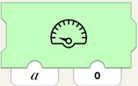
    Green programming block with image of speedometer. Two tabs are on the bottom, the one on the left has letter a, the one on the right has number 0.指示小部件畫布上具有通道-ID(第一參數)的速度表、整數顯示或任何其他顯示部件以顯示數值(第二參數)。
    Green small programming block with nub on top. Has slider icon with hatch marks inside. Tab underneath has number zero.回報小部件畫布上具有通道-ID(第一參數)的滑桿小部件的位置(-100 到 100)。
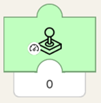
    Green small programming block with nub on top. Has joystick icon on block with image of speedometer in lower lefthand corner. Tab underneath has number zero.回報小部件畫布上具有通道-ID(第一參數)的搖桿小部件的振幅(-100 到 100)。

    搖桿離中心越遠,數值就會越高。 在搖桿的上半部,回報的數值將為正數。 在搖桿的下半部,回報的數值將為負數。
    Green small programming block with nub on top. Has joystick icon on block with image of steering wheel in lower lefthand corner. Tab underneath has number zero.回報小部件畫布上具有通道-ID(第一參數)的搖桿小部件的角度(標準化為 -100 到 100,而不是以度數為單位,度數範圍為 -90 到 90!)。

    如果搖桿指向直上或直下(無論振幅如何),則積木輸出為 0。 如果搖桿的手柄被順時針移動,數字就會變成負數,並且在直接向左或向右時減少至 -100。 如果搖桿的手柄被逆時針移動,數字就會變成正數,並會朝著 100 增加。


    如果您對上述任何積木有任何疑問或需要任何其他幫助,請與我們聯繫